
Privacy
Auditing Your Browser Privacy Workflow in 2026
A workflow-native guide to browser privacy audits covering fingerprinting, tracking parameters, cookies, local processing, and privacy-aware utility workflows.
Auditing Your Browser Privacy Workflow in 2026
A workflow-native guide to browser privacy audits covering fingerprinting, tracking parameters, cookies, local processing, and privacy-aware utility workflows.
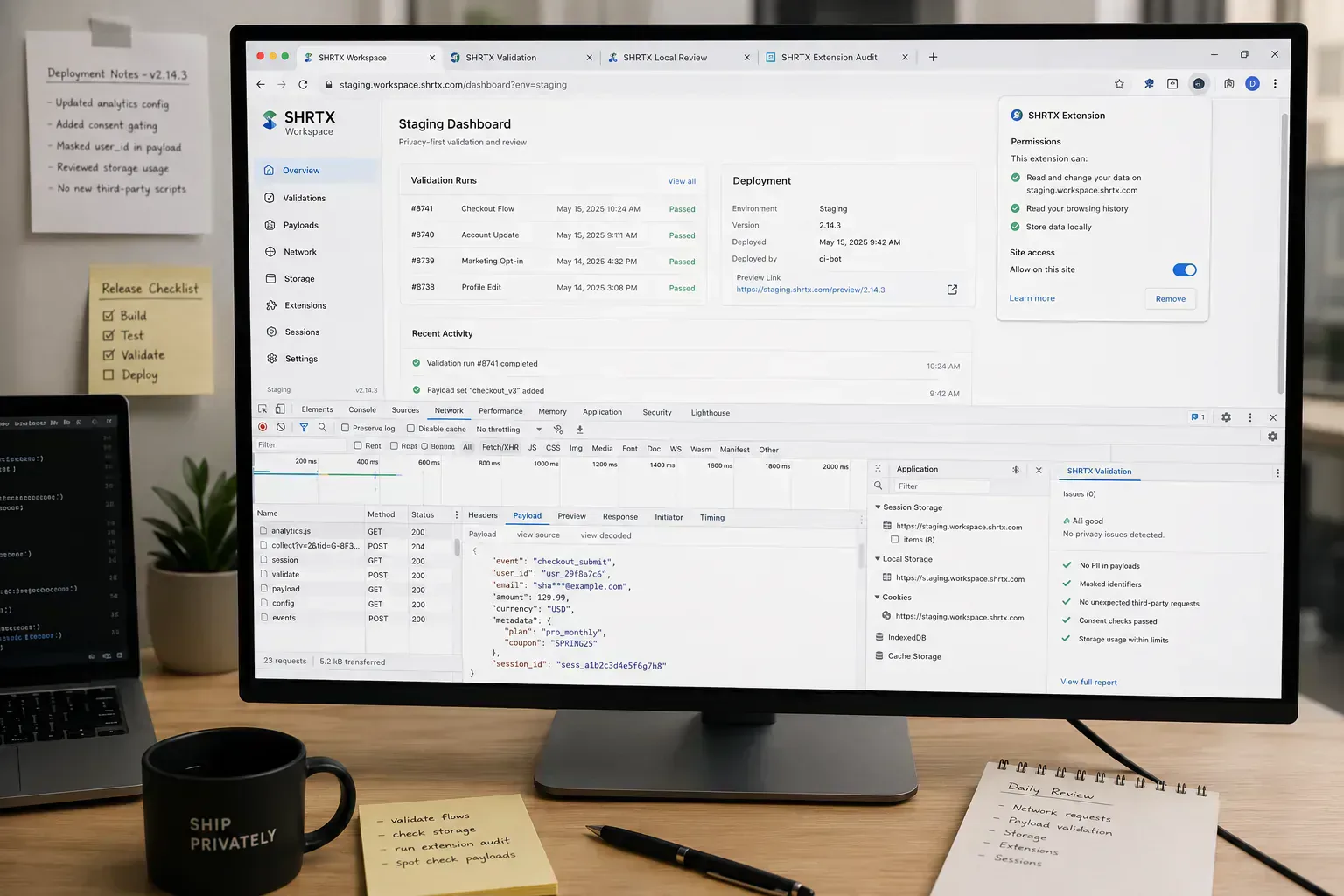
A privacy audit often starts when a normal browser workflow begins to look too convenient. A QA screenshot includes a staging token in the URL. A browser extension asks to read every tab. A preview link is sent to a client before analytics scripts and third-party embeds have been checked.
Modern browser work mixes local files, cloud apps, extensions, trackers, embedded previews, and internal admin panels. The risk is not one bad setting. It is the number of small trust decisions made during deployment review, support debugging, and temporary client handoff.
A useful audit follows the artifact. What enters the browser, what code can see it, what persists after the task, and what leaves the device during the next handoff.
Quick Answer
A browser privacy audit starts with the artifact under review: a preview link, copied payload, screenshot, staging dashboard, or client handoff folder. Trace what the browser stores, which scripts and extensions can read it, and what leaves during deployment review before the same artifact moves into Slack, Jira, or a temporary review link.
Start With the Work, Not the Settings Panel
Browser privacy advice often begins with settings. Settings matter, but teams need to map the work first. A developer inspecting copied API payloads, a marketer sharing dashboard screenshots, and a support agent reviewing customer data face different browser risks.
List the artifacts: files, preview links, screenshots, documents, logs, copied text, and staged payloads. Then identify which browser surfaces touch them: tabs, extensions, upload fields, local tools, preview services, analytics scripts, and AI assistants.
This is where privacy failures usually start. A copied staging response lands in a ticket, an internal admin panel stays open while a screenshot is taken, or a client review link keeps session state longer than expected.
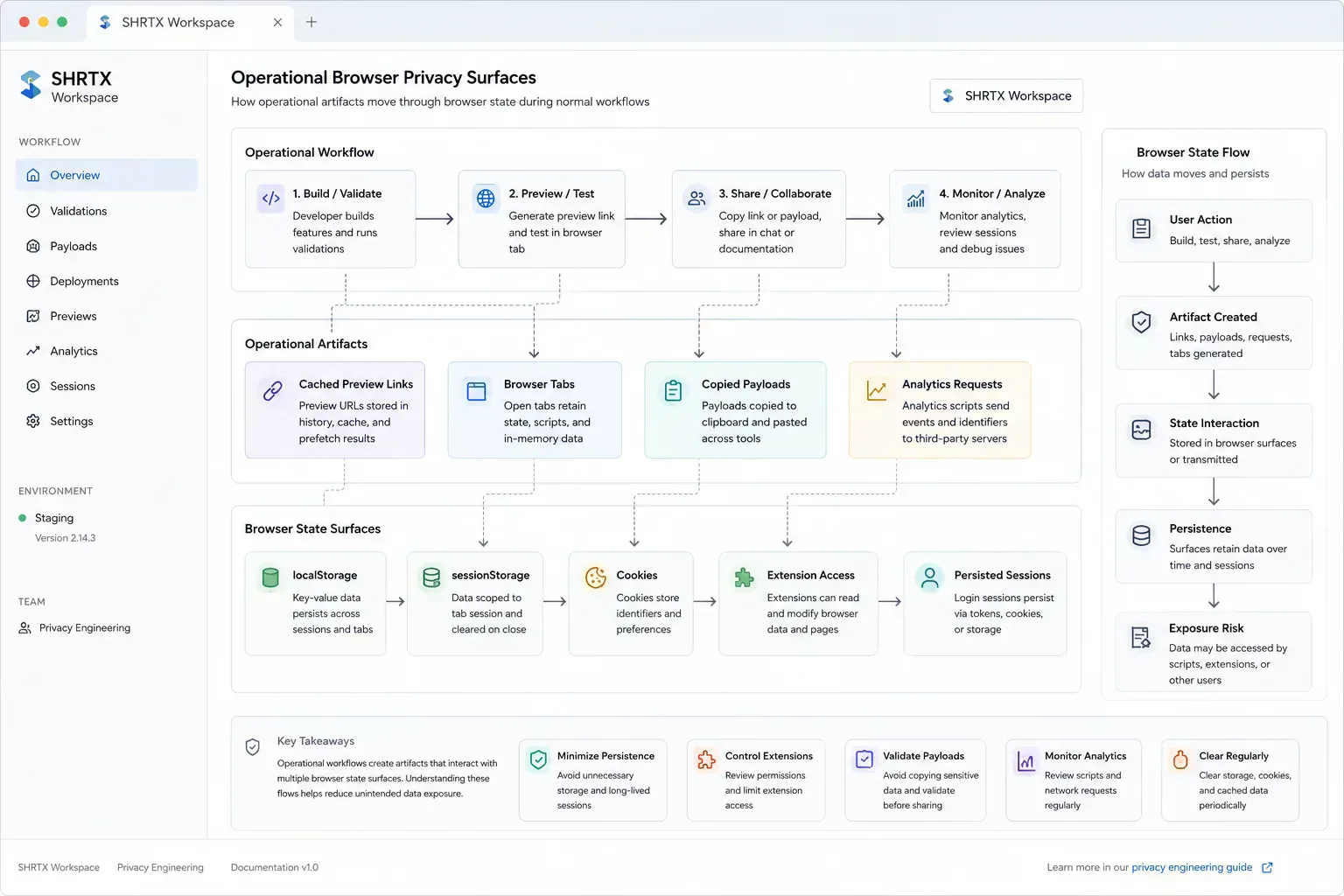
For browser-state review, a small local helper can expose what survives after the workflow ends. Run this only on properties you own or are authorized to inspect, such as a staging app, QA environment, or internal tool.
type StorageSurface = "localStorage" | "sessionStorage" | "cookie"

type StorageFinding = {
  surface: StorageSurface
  key: string
  bytes: number
  reason: string
}

const sensitivePattern = /(token|secret|email|session|customer|account)/i

function collectBrowserStateFindings(allowedPrefixes = ["theme", "locale"]) {
  const findings: StorageFinding[] = []

  const inspectStorage = (surface: StorageSurface, storage: Storage) => {
    for (let index = 0; index < storage.length; index += 1) {
      const key = storage.key(index) ?? ""
      const value = storage.getItem(key) ?? ""
      const expected = allowedPrefixes.some((prefix) => key.startsWith(prefix))

      if (!expected || sensitivePattern.test(`${key} ${value}`)) {
        findings.push({
          surface,
          key,
          bytes: new Blob([value]).size,
          reason: expected ? "sensitive-looking value" : "unexpected persisted key"
        })
      }
    }
  }

  inspectStorage("localStorage", window.localStorage)
  inspectStorage("sessionStorage", window.sessionStorage)

  document.cookie
    .split(`${String.fromCharCode(59)} `)
    .filter(Boolean)
    .forEach((entry) => {
      const [key = ""] = entry.split("=")
      findings.push({
        surface: "cookie",
        key,
        bytes: entry.length,
        reason: "review cookie scope and expiry"
      })
    })

  return findings
}
Extensions Are Part of the Data Boundary
Extensions can be useful, but they expand the trust surface. A tool that runs in the page context may see content that was never meant for it. That matters when teams handle staging dashboards, analytics consoles, internal documentation, or sensitive support forms.
Audit extensions by workflow, not by name recognition. Check which extensions can read all sites, inject scripts, capture screenshots, modify headers, or inspect network traffic. The risky moment is often a temporary workflow: QA installs a debugging helper, a contractor uses a screenshot extension, or a reviewer leaves a broad permission enabled after a release.
A realistic failure looks like this: an AI browser assistant requests "read and change all site data" while an internal dashboard, analytics overlay, and copied admin payload are open in nearby tabs. The extension may never be malicious, but its permission scope is now larger than the task, and customer records in a preview environment sit inside that scope.
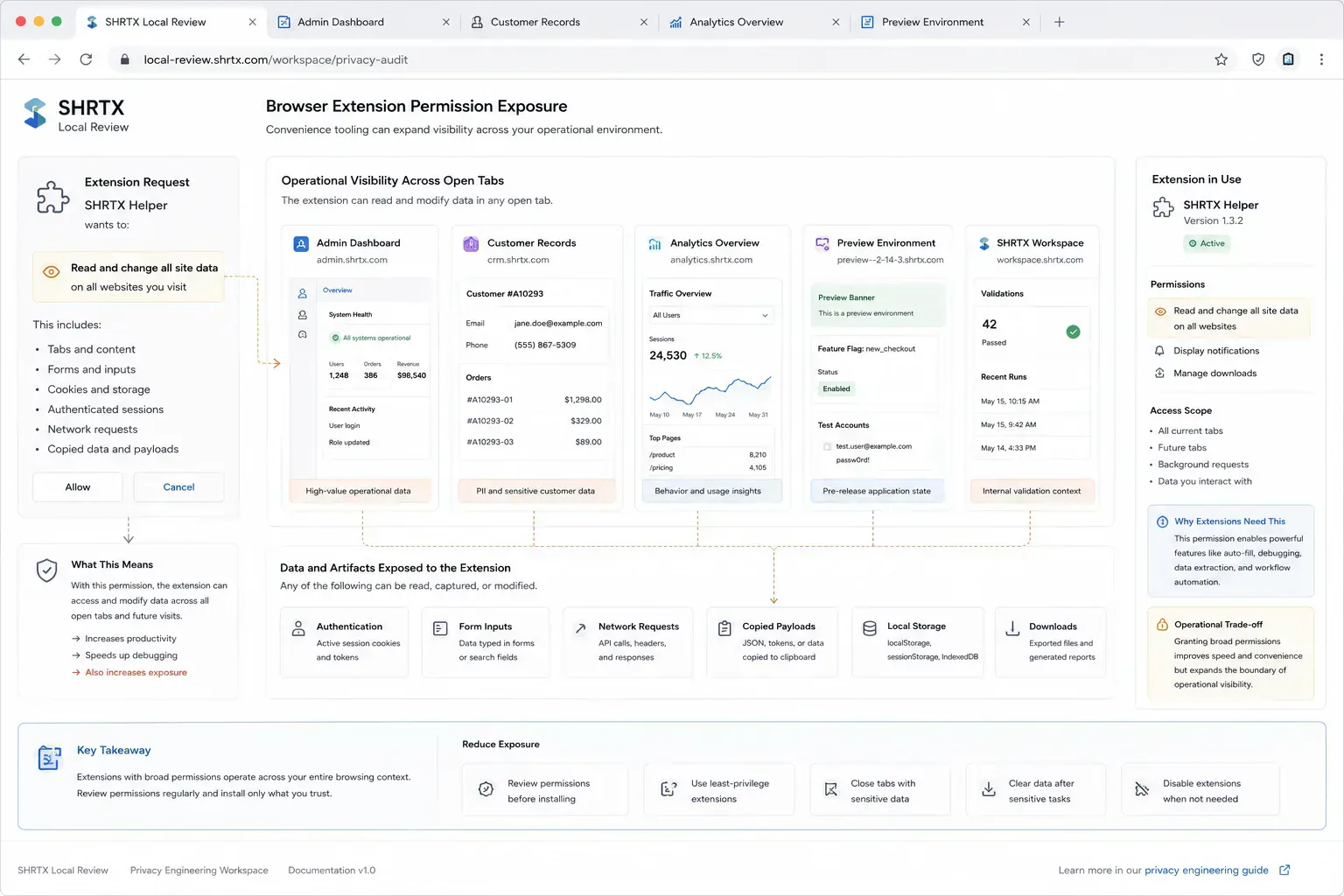
This review should repeat when work changes. A browser that was safe for public content review may be too exposed for an internal admin panel, customer dashboard, or token-bearing preview environment.
Local Tools Reduce Unnecessary Exposure
Many privacy-sensitive checks do not need cloud processing. EXIF Remover, File Size Analyzer, Image Compressor, and Filename Normalizer can support preparation before an upload or share step.
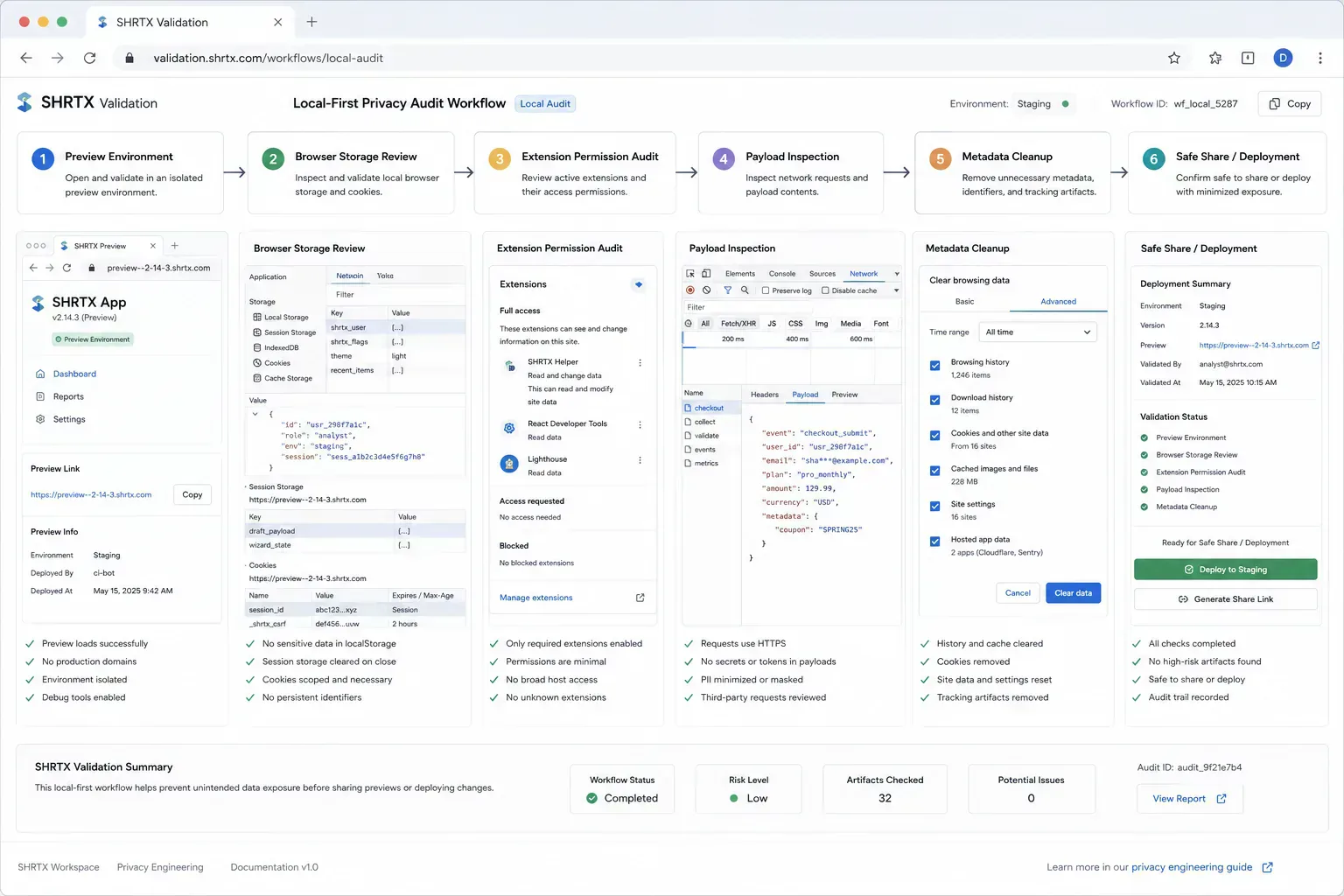
The browser is already the place where the user selected the file, copied the payload, or opened the preview link. Keeping inspection and cleanup there can remove an entire custody step. In a SHRTX Workspace review, that means a browser-native inspection flow before the artifact enters a ticket, CMS, vendor form, or client review folder.
Payload work follows the same boundary. JSON Formatter & Validator belongs before copied staging data enters an API debugging thread. Deep Link Builder belongs when preview links need route intent checked before a mobile or client handoff. PGP Key Viewer fits a local inspection step before a public key becomes part of a trust process.
The audit question is blunt: can the first useful answer happen without uploading the artifact somewhere else. If yes, keep the first pass local and document why any remote step is still needed.
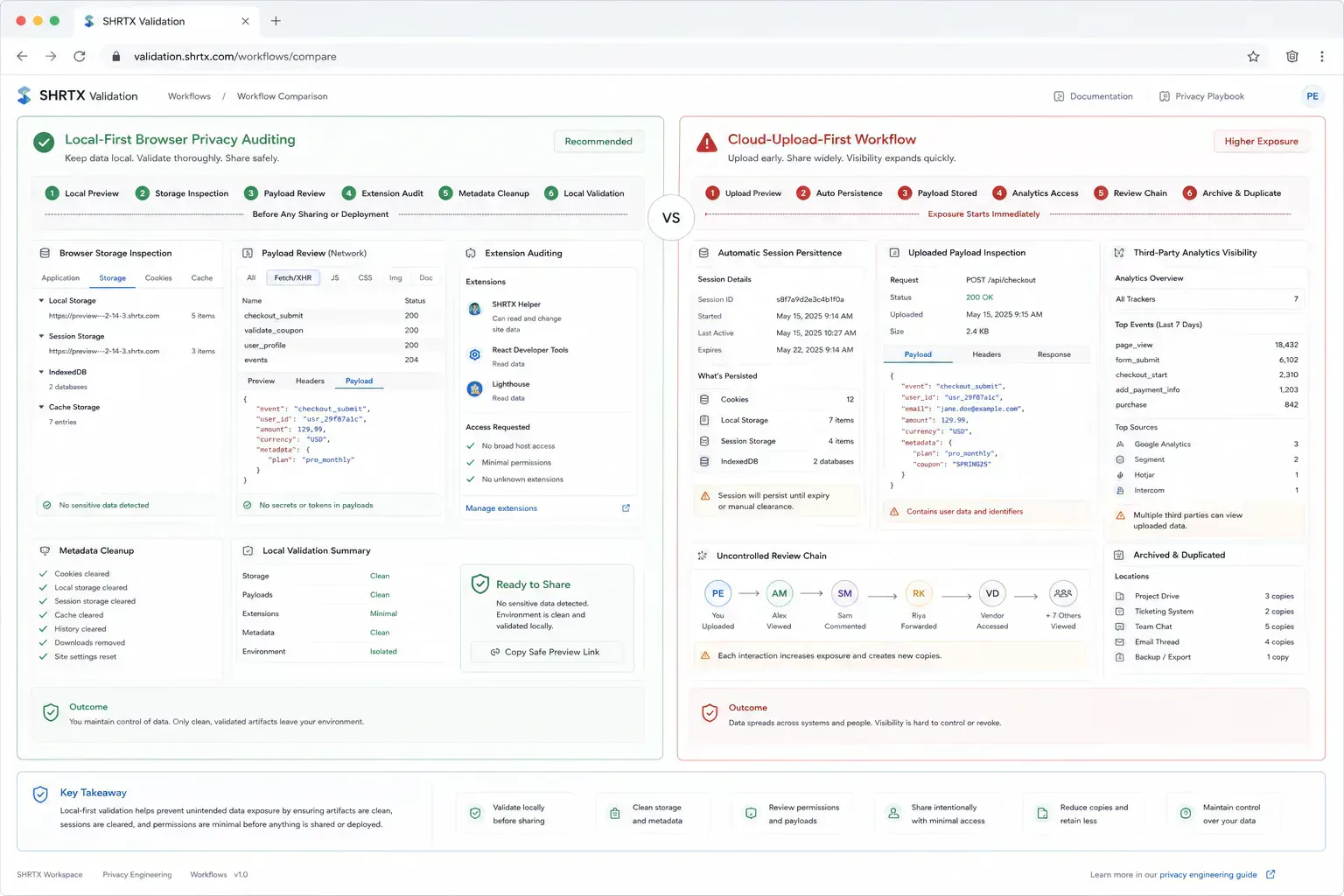
| Audit Dimension | Local-First Browser Workflow | Cloud-Upload-First Tooling |
|---|---|---|
| Data transit | Selected files and copied payloads stay in the browser session | Artifacts move to another service before the first answer |
| Session exposure | Reviewer can inspect cookies, storage, and visible state before sharing | Session-bearing screenshots or exports may travel through review systems |
| Audit visibility | Network requests, storage keys, and extension access are visible near the source | Processing boundary depends on the remote service and its retention behavior |
| Extension risk | Permissions can be checked against the current page and workflow | Broad helper extensions may see content before the audit begins |
| Review-chain exposure | Metadata and identifiers can be removed before tickets or client links | Cleanup often happens after the artifact has already been copied |
Common Audit Findings
The common findings are rarely exotic. Teams keep unused extensions installed, screenshots include personal data, and filenames expose project names. Image metadata remains attached, or large files get uploaded to random converters because the destination platform rejects them.
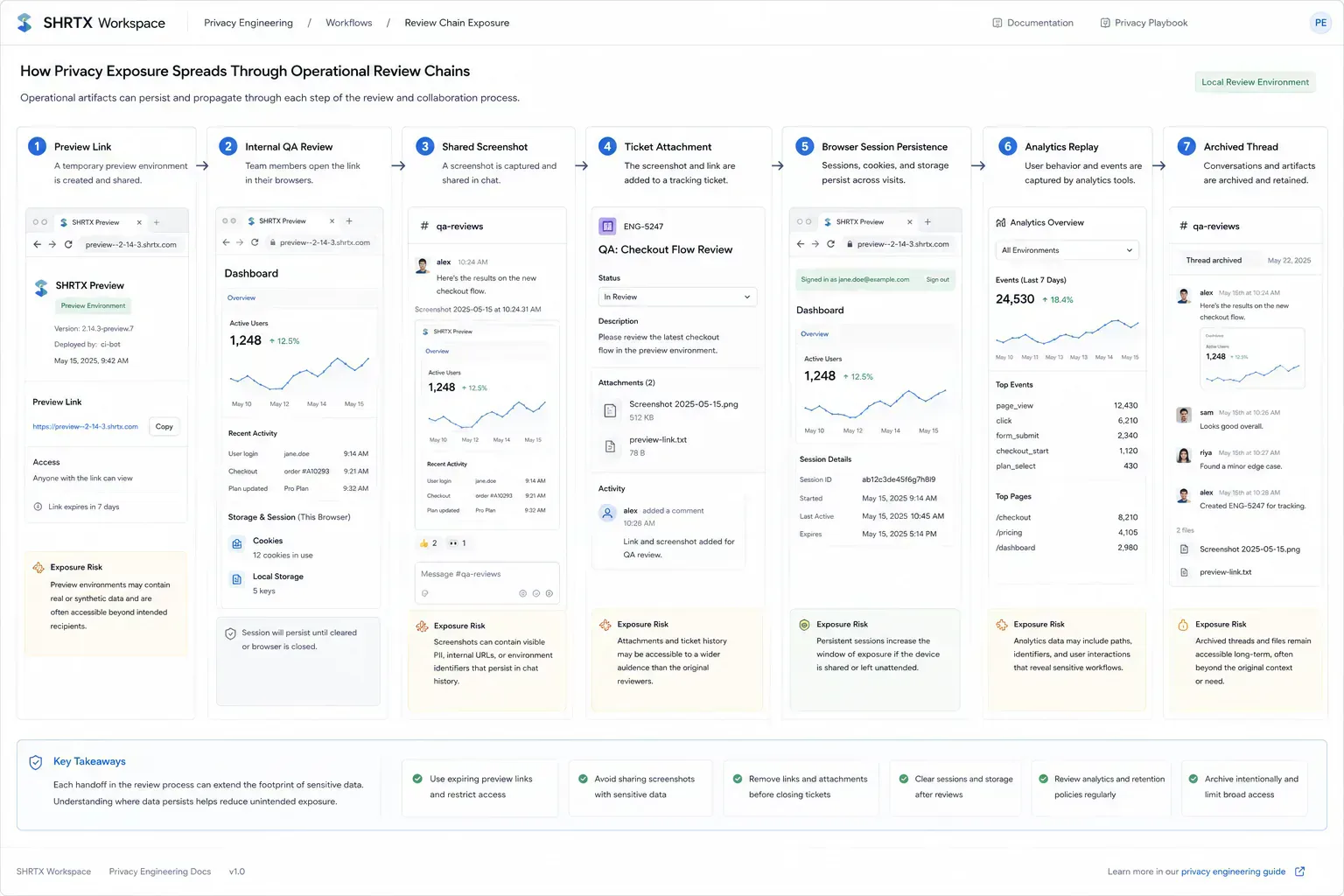
More modern findings sit inside browser state and network behavior. A staging dashboard leaves a customer ID in localStorage, a preview link sets cookies that survive the review, or an analytics script fires on a temporary client-facing page. A third-party embed may load before anyone checks which requests it makes.
These findings are operational, not theoretical. They show where privacy depends on whether the workflow gives users a practical safer option. Most failures happen because the convenient route is also the fastest route.
Where Browser Privacy Still Needs Infrastructure
Some privacy protections need organization-level infrastructure: managed devices, SSO policy, network controls, data loss prevention, audit logs, and incident response. Browser-native tools do not replace those systems.
They do reduce the number of routine tasks that require external processing. That lowers exposure before infrastructure becomes the only line of defense. It also gives teams a clearer record of which artifacts were checked locally and which needed a governed system.
A Lightweight Review Cadence
A practical audit cadence checks browser permissions, high-risk workflows, upload destinations, file cleanup practices, and tool claims. It should also verify that content and metadata accurately describe local processing.
For release work, include preview environments and deployment review chains. Open DevTools, inspect request destinations, review cookies and storage, then capture screenshots only after browser chrome and visible identifiers are checked. If a temporary client link includes analytics or embeds, treat it like a production-facing surface until it is removed.
The goal is not to turn every task into audit paperwork. It is to keep privacy boundaries visible enough that routine work does not create accidental data movement.
Failure Analysis in Practice
The failure pattern behind browser privacy audits is usually mundane. Teams do not need dramatic incidents to lose time. A QA link is shared with session state intact, a copied payload includes a real account ID, or a browser extension sees an internal dashboard because it still has broad page access.
Practical authority comes from naming those small breaks clearly. They are the details that show the workflow has been tested against real handoffs rather than described from a distance.
For privacy workflows, the useful lens is custody: what data enters the workflow, what remains local, what leaves the browser, and what claim the product can honestly support. In SHRTX validation workflows, that boundary is attached to the artifact before it reaches the next review system.
Ecosystem Placement Without Catalog Noise
This topic belongs inside a broader browser-native system: local preparation, lightweight diagnostics, media hygiene, metadata alignment, URL review, and content clarity. The ecosystem is useful only when those tools appear at the point where the reader needs them.
A payload issue can route to JSON Formatter & Validator before it enters a ticket. A media issue can route to EXIF Remover, Image Compressor, or File Size Analyzer before CMS upload. A route issue can route to Deep Link Builder before a preview link moves through a client review chain.
The next step should feel obvious from the workflow context. SHRTX browser-native tooling environments are useful when they keep the artifact near the operator who still understands the risk.
What Strong Implementation Looks Like
Strong implementation is usually small and consistent. Check the artifact before handoff, preserve the processing boundary, and keep metadata aligned with visible content. Use real browser state, real preview links, and real request destinations rather than ideal samples.
That approach keeps the audit grounded and gives teams a repeatable way to apply it in their own workflows. The point is not to make the browser perfect. The point is to know what it can see, what it stores, and what it sends.
Handoff Discipline
The handoff is where many workflow problems become visible. A staging screenshot reaches Jira before browser chrome has been checked, or a preview link is shared before analytics requests are inspected. A copied payload enters Slack before session identifiers are removed, and a third-party embed may be approved before its request pattern is reviewed.
The practical answer is not to add process everywhere. It is to add the right check before the artifact leaves the person who can still fix it quickly. That check should be small enough to run consistently and specific enough to catch a predictable failure.
Local-First Workflow Lens
A local-first lens does not mean every task must stay in the browser. It means the workflow should identify the point where local preparation is cheaper, safer, or clearer than remote processing. That point may be storage inspection before screenshots, cookie review before preview sharing, JSON cleanup before API debugging, or metadata cleanup before CMS upload.
When the browser can provide the first useful answer, the workflow becomes easier to operate. The user can correct the artifact while context is still fresh. The team can avoid unnecessary retries. The platform can avoid receiving data it did not need.
The same lens keeps the guidance specific. It forces a boundary: before upload, before deployment, before indexing, before sharing, before publication, or before a remote system receives sensitive context. Once that boundary is clear, the audit can stay useful without padding or keyword repetition.
Operating With Real Constraints
Real workflows have device limits, platform limits, team handoffs, old assets, inconsistent samples, and deadlines. Good guidance should survive those constraints. It should not assume perfect data, perfect network conditions, or a team with unlimited time to inspect every artifact manually.
That is why small browser-native checks matter. They give teams a way to reduce uncertainty while the artifact is still close to the source. The result is not a perfect process. It is a more reliable path from local preparation to the next system.
The constraints show up during normal review. A QA environment keeps old session state. A contractor receives a temporary link with analytics enabled. A copied payload is replayed in a console and creates a new log trail. The audit should catch those ordinary leaks before they become part of the workflow.
What to Document
Useful documentation is short: name the artifact, the destination, the check that was run, and the risk that remains. If a preview link was inspected, record request destinations and cookie behavior. If a screenshot was shared, note whether browser chrome and storage state were checked. If a payload was cleaned, keep the representative sample.
This creates continuity without turning the workflow into a report. The next person does not need to repeat the same diagnostic step, and the team has enough context to understand why the artifact is ready for the next system. The note also prevents a temporary review artifact from being treated as safe simply because it has already been shared.
That context matters during deployment reviews, support escalations, client preview cycles, and tooling migrations. The audit boundary stays attached to the artifact instead of disappearing into chat history.
Privacy Auditing Is Operational Hygiene
A browser privacy audit is most useful when it follows the workflow. Settings, extensions, files, network requests, browser storage, preview links, and local tooling all shape the boundary. The audit stays useful when that boundary is checked before each handoff.
Treat the audit as deployment hygiene, not a quarterly cleanup ritual. Inspect browser state locally, document the remaining risk, and reserve cloud processing for work that needs a remote system. The habit is simple: verify the trust boundary before the artifact leaves the tab, the workspace, or the SHRTX local review pipeline.
Tools Referenced By Topic
Browser Fingerprint
Audit your unique hardware and software identity for privacy leaks.
Cookie Audit Tool
Deconstruct and audit cookie strings for security attributes like HttpOnly and Secure flags.
File Encryption (local)
Securely encrypt or decrypt any file locally using military-grade AES-GCM 256-bit encryption.
Related Reading
Feb 12, 2026 • 10 min
Zero-Log Architecture for Browser-Native Tools
An engineering-focused privacy guide to building browser tools that minimize server visibility, avoid unnecessary file custody, and keep processing boundaries auditable.
Apr 2, 2026 • 12 min
Why Browser-Based Data Masking Fits Secure Enterprise Workflows
A practical guide to browser-based data masking, PII cleanup, redaction workflows, and local-first preparation before sharing operational datasets.
Jan 23, 2026 • 10 min
The Hidden Costs of Free Cloud File Converters
A practical privacy guide to the operational risks behind free cloud file converters, upload-based processing, metadata exposure, and browser-native alternatives.