
Engineering
Leveraging Modern Web APIs for Desktop-Class Tools
Modern Web APIs let browser tools handle files, compute, and graphics with local speed and clear permissions, without installs.
Leveraging Modern Web APIs for Desktop-Class Tools
Modern Web APIs let browser tools handle files, compute, and graphics with local speed and clear permissions, without installs.
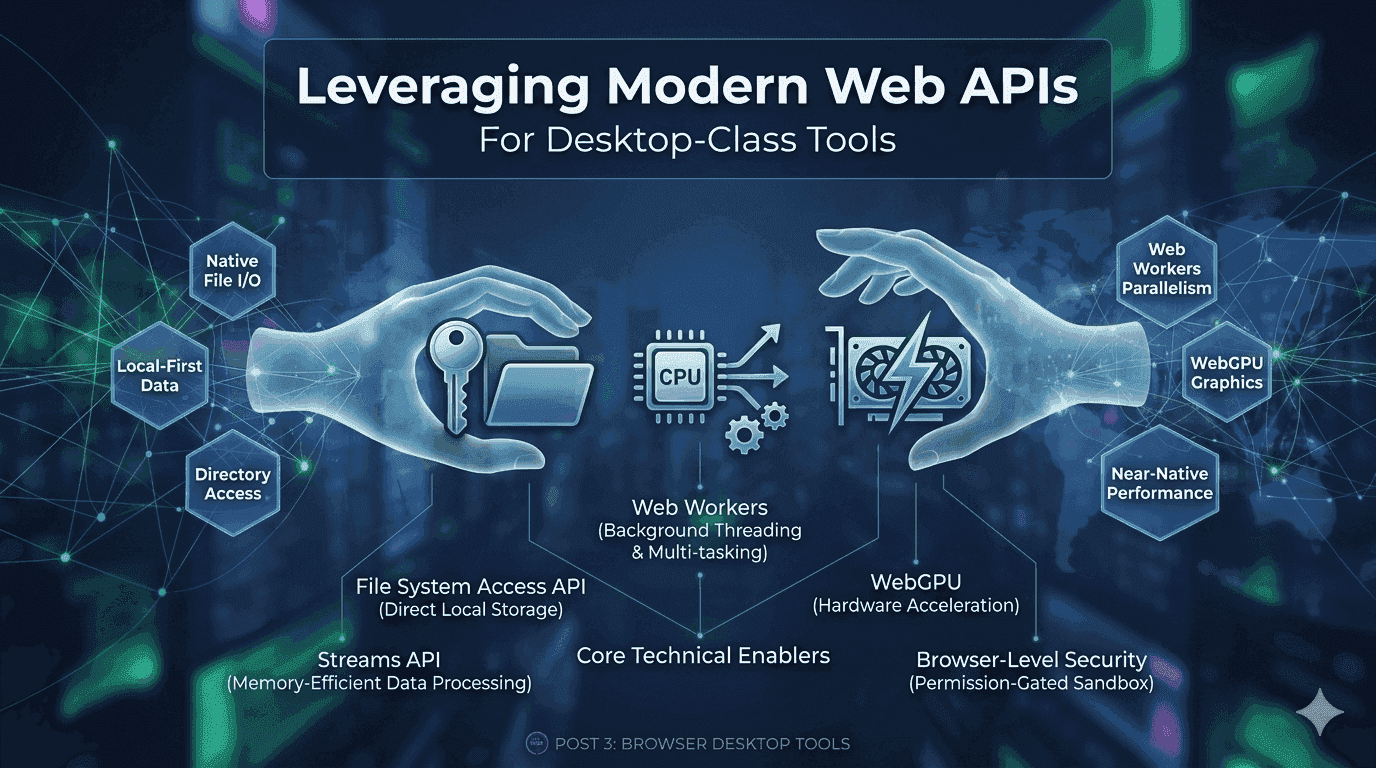
Browsers are no longer just document viewers. They now run local compute, work with selected files, coordinate background threads, and enforce tight permission boundaries. The practical shift is quieter than most platform changes: a tab can now behave like a controlled execution environment.
That matters when the alternative is a slow upload, a server-side queue, and another download before the user can inspect the result. This article looks at the APIs behind that change and the patterns that keep browser-native tools stable under load. The focus is File System Access, File APIs, Web Workers, Streams, Canvas, WebGPU, and the local processing pipelines that connect them.
The Browser as an Execution Environment
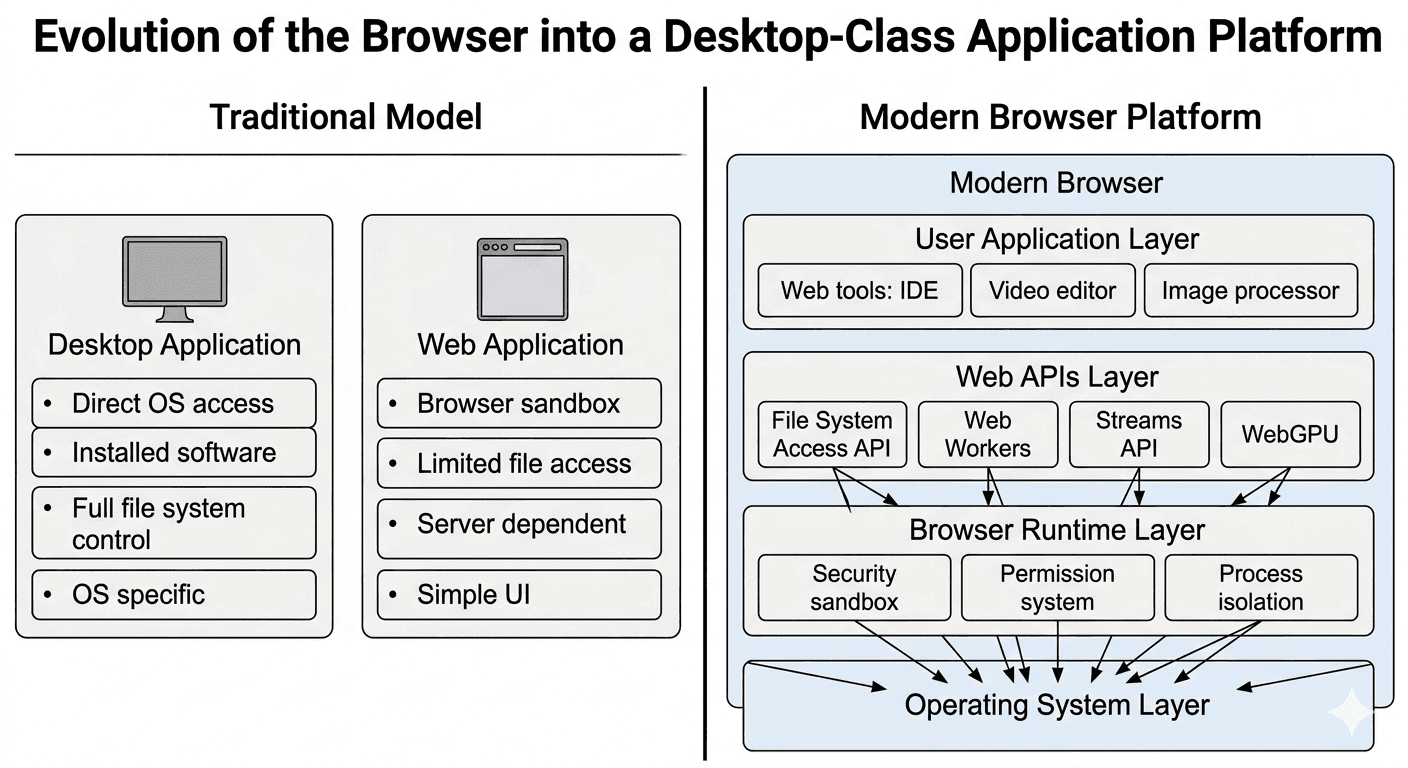
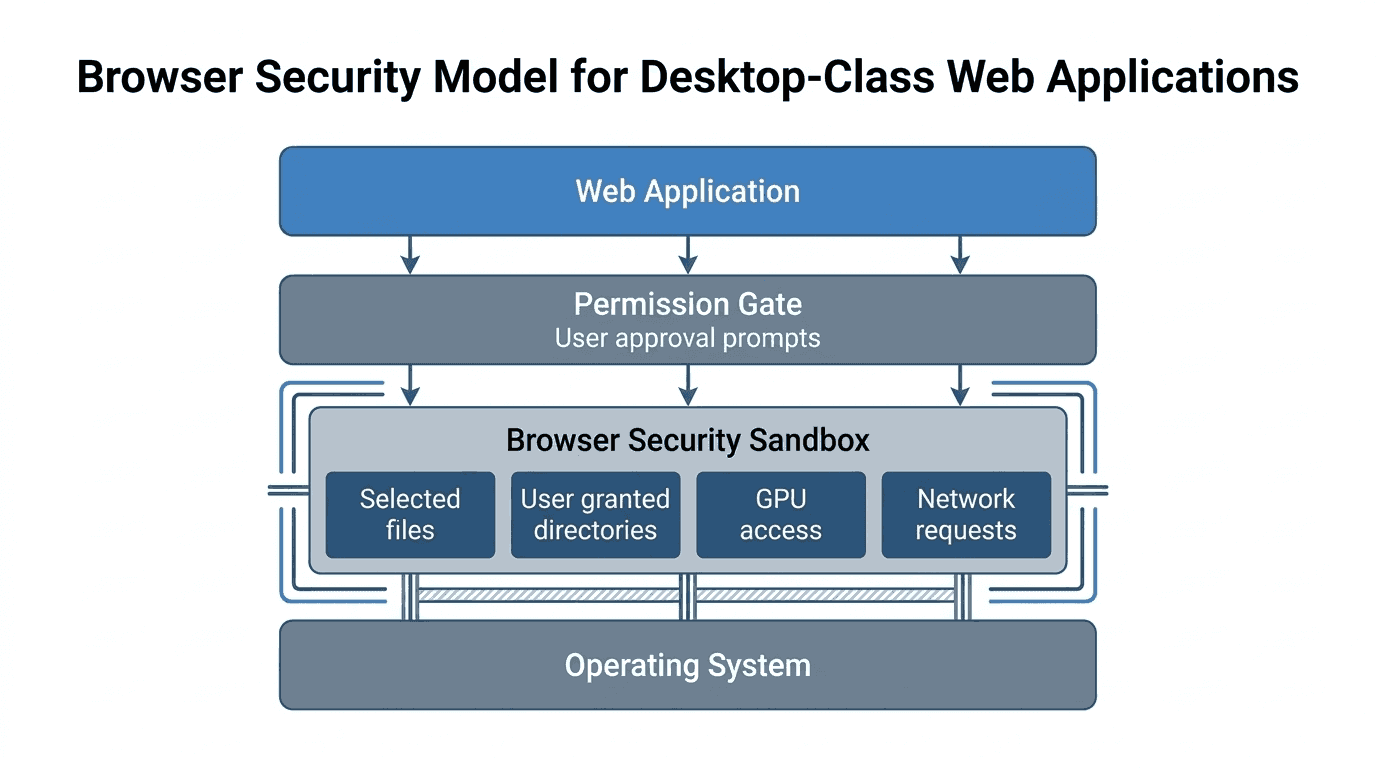
Desktop apps once had direct access to files and hardware, but they required installs and OS specific builds. Web apps were easy to share yet they lived inside a tight sandbox. Modern APIs narrow that gap while keeping the browser security model intact.
The browser now exposes file handles, background threads, binary buffers, streaming reads, graphics pipelines, and cryptographic primitives in controlled ways. None of these APIs turns the browser into an unrestricted desktop process. Together, they let a web tool place more work near the input instead of sending every payload through a remote service.
That compute placement is the important part. A local inspection workflow can read a file, stream chunks into a worker, render a preview through Canvas, and return a result without upload latency. The user still gets the permission model of the browser, but the workflow avoids the round trips that make heavy tools feel slow.
File System Access and Real File Workflows
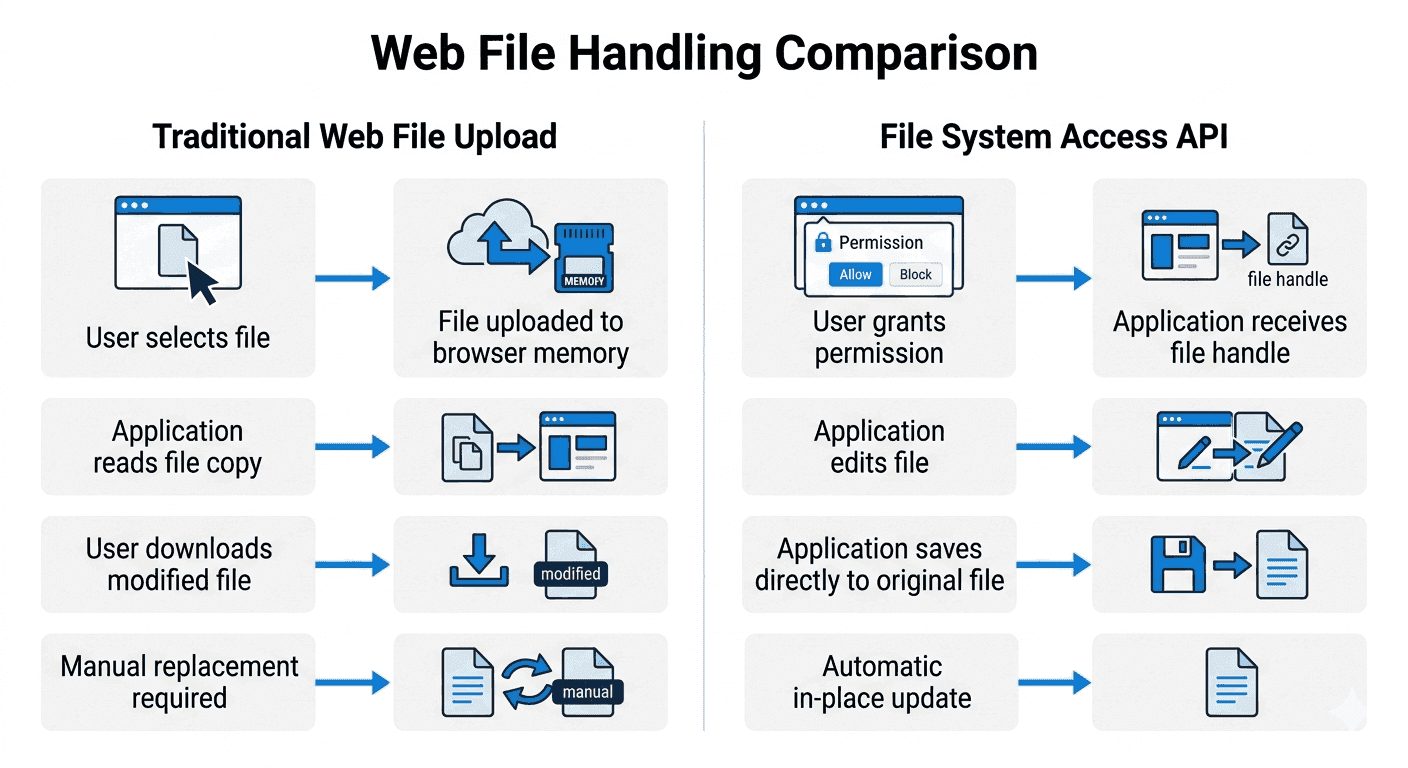
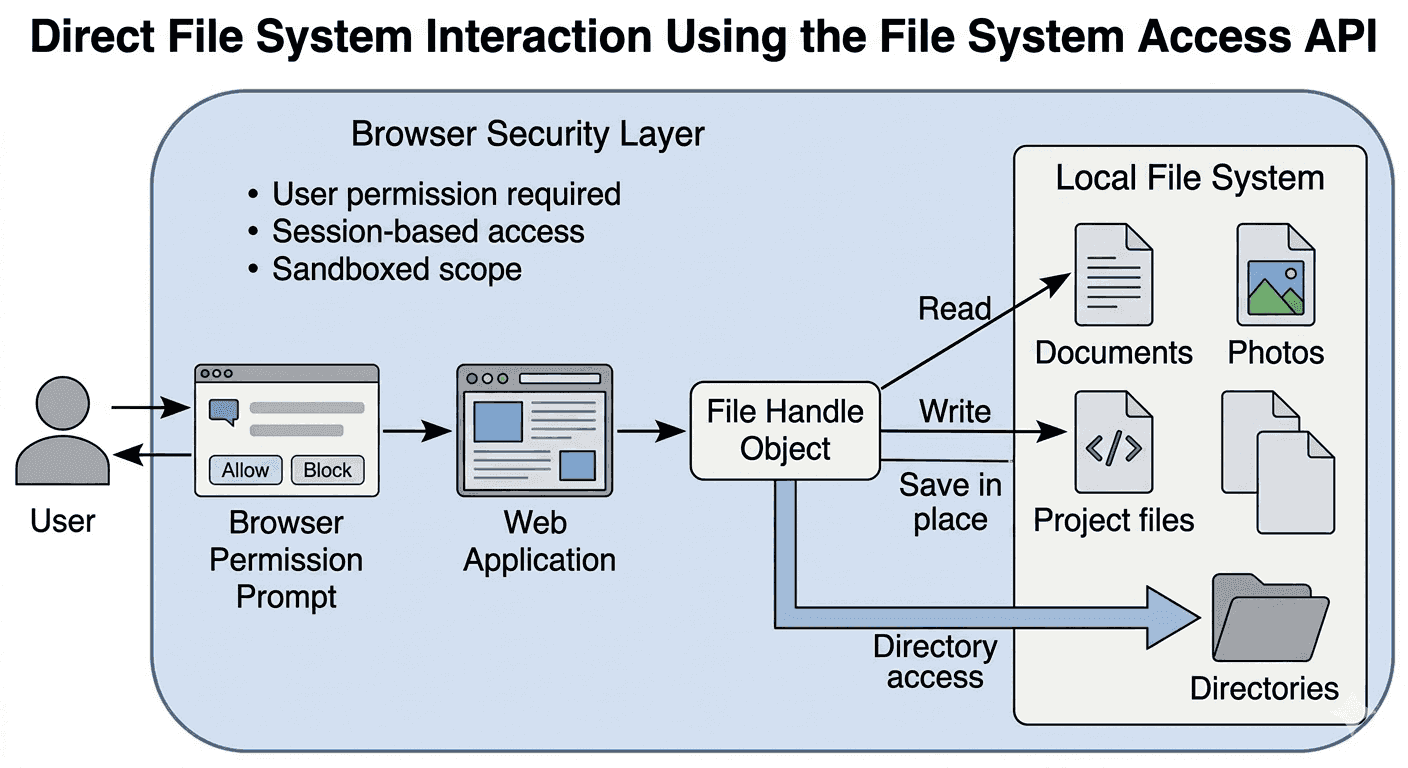
The File System Access API changes how a web app reads and saves files. Instead of a one way upload flow, the app can keep a handle to a real file and write changes back to it.
This supports in place editing and project style workflows with folders. A code editor, photo manager, or local note tool can work across a directory without repeated imports. It also reduces a common source of workflow friction: downloading a revised file, finding it again, renaming it manually, and re-uploading it somewhere else.
Support is not uniform across browsers, so the safe default is still a standard file input. Folder access should be optional and only exposed when the browser supports it.
Access is explicit and time limited. Users pick a file or folder and the browser scopes access to that selection, which keeps the sandbox intact.
The difference shows up in daily work. The modern flow reduces friction for multi file tasks while keeping permission prompts visible. For workflows such as payload diagnostics, EXIF review, or local file cleanup, the permission boundary is part of the product behavior, not a hidden implementation detail.
| Feature | Traditional file input | File System Access API |
|---|---|---|
| Data flow | Read only copy | Read and write to the same file |
| Saving changes | Download and replace | Save in place |
| Directory access | Per file selection | Folder level access with user approval |
| Typical experience | High friction for multi file tasks | Closer to desktop workflows |
Web Workers and UI Stability
JavaScript runs UI work on the main thread. Heavy computation on that thread causes stutter, delayed input, and progress indicators that stop moving when users need them most.
Web Workers move compute to background threads and keep the interface responsive. The main thread sends data to a worker and receives results without blocking. For large files, ArrayBuffers and transferable objects matter because copying the same payload repeatedly can erase the benefit of moving work off the main thread.
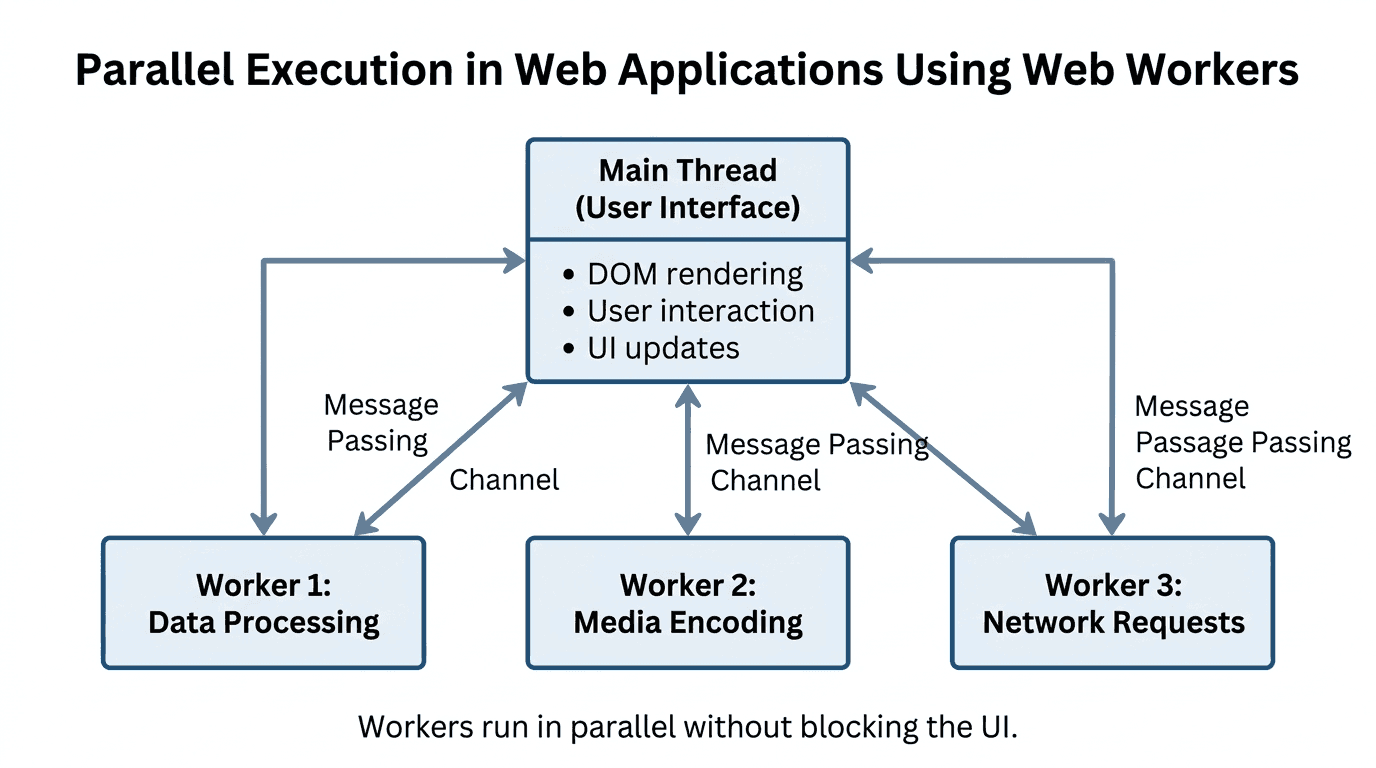
This model scales to parallel tasks, but only when it is controlled. One worker can decode media while another parses data, but concurrency needs caps or a browser tab can hit memory pressure quickly, especially on mobile devices. Worker cleanup is not polish. It is how the tool avoids creeping memory use after a few heavy runs.
Streams for Large Data Sets
Large files are hard to load in one shot. The Streams API processes data in chunks, so memory use stays stable while work continues.
This is ideal for long videos, large logs, big design assets, and upload preflight checks. A stream lets the tool read, transform, and discard each chunk in sequence. That changes the feel of the workflow because the user can see progress instead of waiting for a full file to load before anything happens.
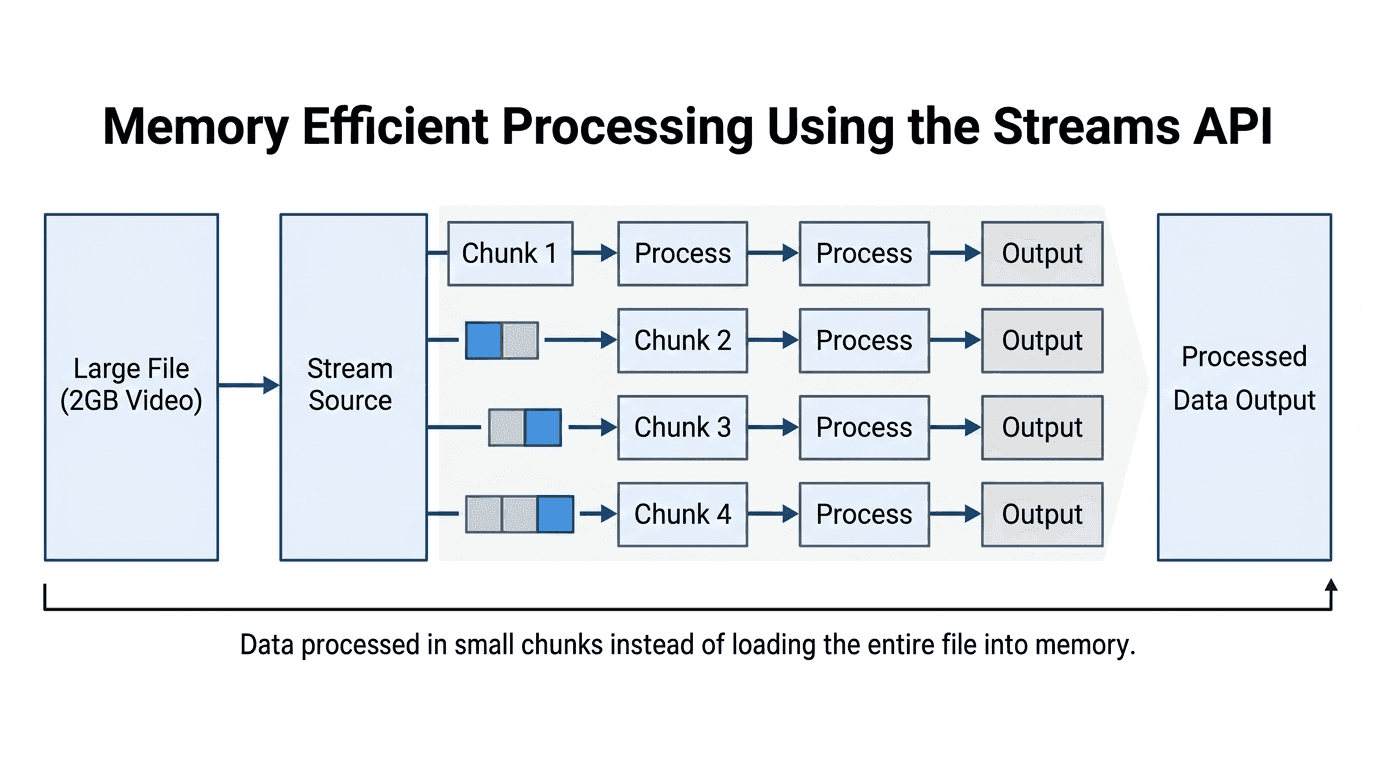
Streams also change error handling because work happens over time. You need clear progress, cancellation, and partial failure states to keep the UI honest. A failed chunk read should not feel like the whole tab froze.
WebGPU and Hardware Acceleration
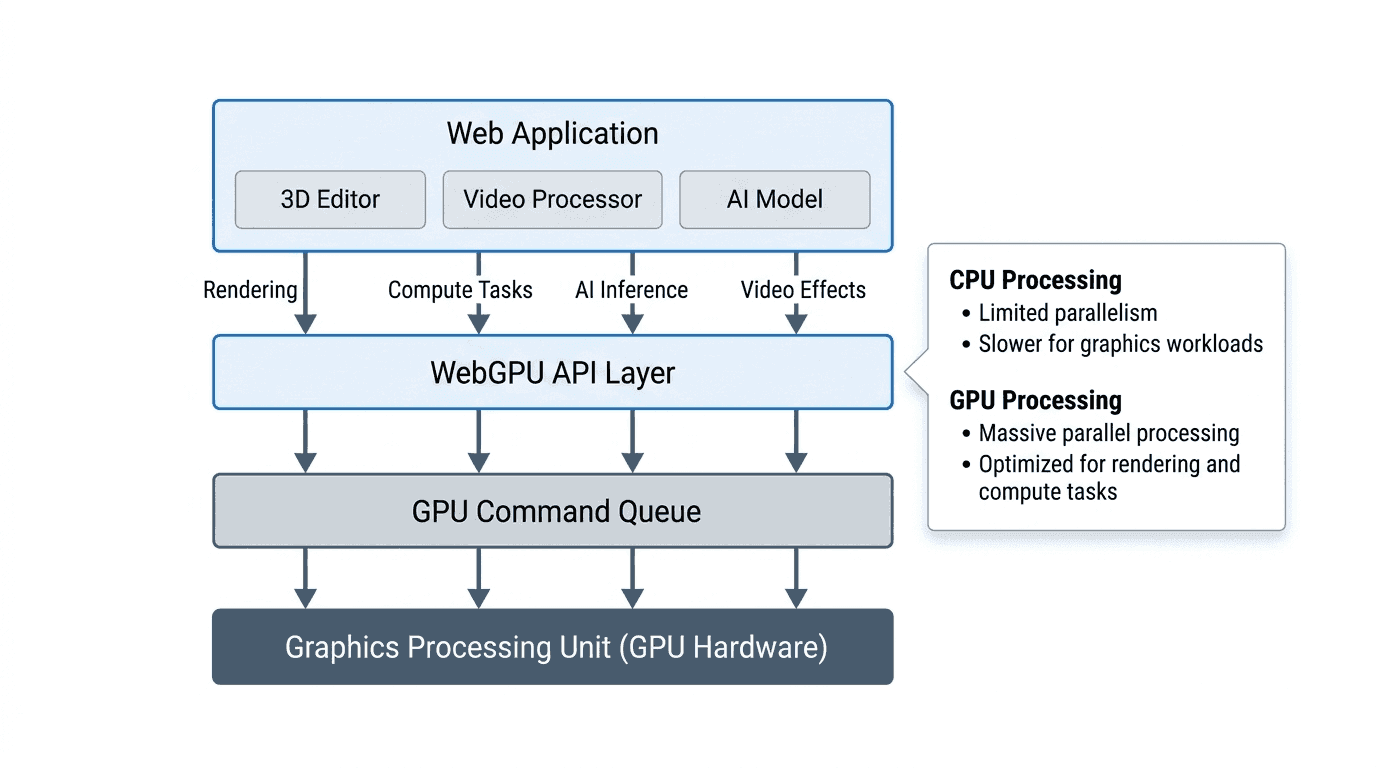
WebGPU gives browser apps direct access to modern graphics hardware through a safer, explicit API. It replaces older WebGL patterns and supports compute style workloads.
Image filters, video effects, and 3D rendering benefit the most. For high-volume image operations, WebGPU can keep pixel work inside the browser instead of sending every frame or asset through a server round trip.
Hardware support varies across devices, so GPU paths need a CPU fallback. That fallback is also useful for testing and for browsers that do not expose WebGPU yet. Desktop-class browser tooling still has to respect device spread, thermal limits, and browser support gaps.
Where SHRTX Applies These APIs
SHRTX keeps most tool processing inside the browser and avoids uploads when possible. The shared uploader and preview manager handle file selection and cleanup so tool code stays thin. The product goal is not to claim the browser is always faster. The goal is to avoid unnecessary transport when the work is deterministic and user-scoped.
In our OCR tools we spin up a Tesseract worker on demand and terminate it after each run. This keeps memory use predictable and avoids UI lockups during extraction.
const { createWorker } = await import('tesseract.js')
const worker = await createWorker('eng', 1, {
  logger: (m) => {
    if (m.status === 'recognizing text') setProgress(Math.round(m.progress * 100))
  }
})
const { data } = await worker.recognize(imageFile)
setText(data.text)
await worker.terminate()
Batch jobs run through a shared processFiles runner that caps concurrency and records per file errors. This prevents a single failure from stopping the full run.
These patterns show up in tools like Image Compressor, Image Metadata Viewer, and CSV Cleaner. Each keeps processing in the browser and routes heavy work through shared helpers so the UI stays responsive.
The same architecture supports inspection before action. File Size Analyzer can evaluate payload composition before an upload attempt. EXIF workflows can inspect and remove metadata without sending photos to a remote service. PGP Key Viewer can parse key structure locally, which keeps the workflow aligned with browser-side inspection rather than server-side collection.
We still use standard file input for most tools because it is supported across browsers. File System Access is on the roadmap for folder level workflows that benefit from it.
Trade-Offs to Plan For
These APIs solve real problems, but they add their own constraints. You need to plan for support gaps, memory pressure, and cleanup costs.
Worker lifecycles need cleanup or memory will creep upward. Streams require cancellation logic or long jobs will feel stuck.
Large image runs can spike memory if they decode in one pass. A tab can freeze, the browser can reclaim it, or the user can lose confidence because the interface stops responding during export. This is why we plan to move to tiled processing and tighter concurrency caps in the image pipeline.
Local execution also changes economics without removing responsibility. It can reduce backend compute pressure and payload transfer costs, but the browser still needs careful scheduling, useful progress states, and fallbacks for weaker devices.
Performance Targets and Measurement
We track performance with repeatable runs on real files and keep internal notes on regressions, memory spikes, and worker behavior. Until a full benchmark set is published, explicit targets guide tool work and regression checks.
These targets are not claims of current speed. They are guardrails that keep worker pipelines, memory use, and UI latency within safe bounds.
| Target | Threshold | Notes |
|---|---|---|
| 10MP image resize | under 200 ms | client-side worker path |
| 50 MB image batch | under 3 s | parallel worker pool |
| INP | under 200 ms | keep input responsive |
| Main thread blocking | near 0 ms | avoid long tasks |
Modern Web Tools vs Traditional Desktop Utilities
With these APIs, the balance between web and desktop changes. Web tools can be fast and local while still respecting permissions.
The difference is not that browser tools replace every installed utility. Dedicated desktop software still makes sense for deep OS integration, very large offline projects, specialized hardware, or workflows that need broad file system control. Browser-native tools win when the task is scoped, repeatable, easy to permission, and costly to send through a remote processor.
| Factor | Traditional desktop app | Modern web tool |
|---|---|---|
| Installation | Required | None |
| Updates | Manual or background | Instant on reload |
| File access | Broad OS trust | Permission gated |
| Hardware access | OS specific | Standard browser APIs |
| Offline capability | Native | Service worker based |
| Security posture | Depends on vendor | Browser sandbox with prompts |
Conclusion
The browser is now a serious runtime for desktop-class tools because it can coordinate local file access, background compute, streaming reads, graphics pipelines, and permission boundaries inside one execution model.
The best results come from compute placement, not from abstract platform claims. When a workflow can inspect, transform, or validate data locally, modern browser APIs reduce transport overhead and keep the task close to the user. When the workflow needs shared state or dedicated infrastructure, the browser should hand off cleanly rather than pretend every task belongs in a tab.
Tools Referenced By Topic
Browser Feature Detector
Audit your browsers support for modern web APIs like WebGL, LocalStorage, and more.
Browser Frame Mockup
Wrap your screenshots in a polished browser window for professional sharing.
Bulk File Renamer
Apply complex naming patterns, prefixes, and numbering to groups of files locally.
Related Reading
Feb 13, 2026 • 11 min
Using WebAssembly for High-Performance Client-Side File Processing
A practical developer look at using WebAssembly in browser tools for heavy data processing without constant cloud API round trips.
Jan 16, 2026 • 10 min
Scaling Browser Utility Suites Without Server Costs
A practical engineering guide to scaling browser-native utility suites with client-side processing, static deployment, local-first workflows, and lightweight infrastructure boundaries.
Feb 13, 2026 • 12 min
The Local-First Software Movement: Building Web Apps That Run Directly on the User's Device
A practical engineering breakdown of local-first architecture, synchronization trade-offs, and privacy boundaries in modern web apps.